
Laptop Still Uses an HDD
An older mechanical hard drive can make startup, application loading and general storage access noticeably slower than SSD-based storage.

Professional SSD Upgrade Service
Laptop running slowly, storage almost full or still using an older hard drive? LaptopSouq provides professional laptop SSD upgrades in Dubai, including HDD-to-SSD upgrades, larger-capacity SSD installation and compatible SATA or NVMe storage upgrades.
Upgrade Indicators
From slow mechanical hard drives to capacity constraints, these signs indicate your laptop may benefit from an SSD upgrade.
An older mechanical hard drive can make startup, application loading and general storage access noticeably slower than SSD-based storage.
The current drive no longer provides enough space for Windows, applications, work files or media.
A smaller-capacity SSD needs to be replaced with a compatible higher-capacity drive.
Storage performance may be contributing to slow boot, application loading and file access, especially on systems still using an HDD.
A failed or unreliable storage drive may need replacement before Windows or data can be restored.
A compatible SSD upgrade may improve storage-dependent loading and file-transfer performance.
Laptop SSD upgrades are not one-size-fits-all. Depending on the laptop model, the system may use a 2.5-inch SATA drive, an M.2 SATA SSD, an M.2 PCIe/NVMe SSD or another model-specific storage configuration. Physical fit alone does not guarantee interface compatibility.
LaptopSouq checks the laptop model, existing drive, available storage slot and supported interface before recommending the SSD type and suitable capacity options based on storage requirements and laptop compatibility.
When the existing drive is healthy and the configuration is suitable, an SSD upgrade may involve moving the current Windows installation, applications and user data to the new drive. If the source drive is failing, corrupted or unsuitable for migration, a clean Windows installation or separate data-recovery process may be more appropriate.
LaptopSouq confirms the data and operating-system plan before replacing the system drive.
Our Process
From laptop assessment to boot and storage testing, each step is handled carefully.
The laptop model, current drive type, storage capacity, source-drive condition and upgrade goal are checked.
The supported storage interface, form factor, SSD capacity and migration or Windows-installation requirements are confirmed.
The compatible SSD is installed according to the laptop's storage design.
Where suitable, the existing Windows installation, applications and user data are moved to the new SSD, or Windows is installed according to the agreed setup.
SSD detection, system boot, available capacity and normal storage operation are verified before return.
Service Options
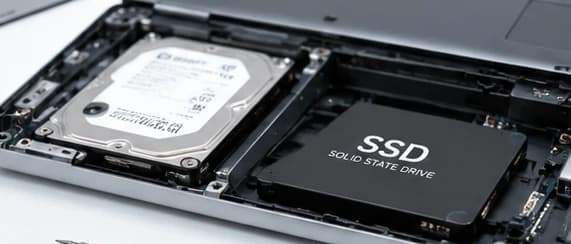
For laptops still using a mechanical hard drive that can be upgraded to a compatible SSD.
Starting from AED 199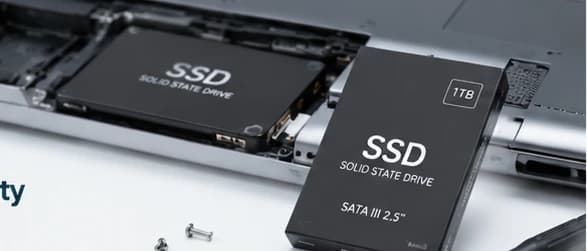
For laptops with an existing SSD that needs more storage capacity.
Starting from AED 199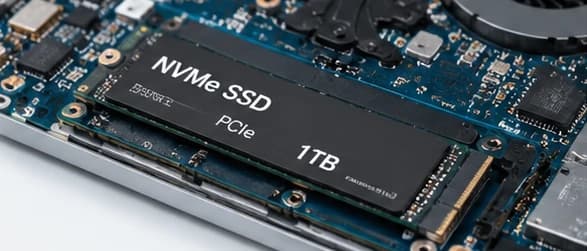
For compatible laptops supporting M.2 PCIe/NVMe storage upgrades.
Starting from AED 199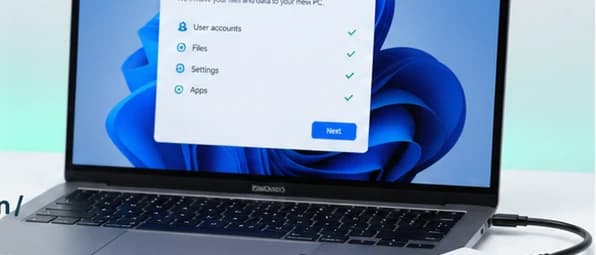
For compatible upgrades requiring transfer of the existing Windows system and data to the new SSD, or a fresh Windows installation when migration is not suitable.
Starting from AED 199SSD Compatibility Verified First
M.2 is a form factor, not a guarantee of NVMe. Some M.2 storage devices use SATA while others use PCIe/NVMe. We verify compatibility before installation.
Upgrade Options
Supported Brands
SSD upgrade and storage replacement services for major laptop brands and popular model series across Dubai.







Model Coverage
Inspiron, Latitude, XPS, Vostro, Precision, Alienware
Pavilion, ProBook, EliteBook, Envy, Spectre, ZBook, Omen
ThinkPad, ThinkBook, IdeaPad, Yoga, Flex, Legion
VivoBook, ZenBook, TUF, ROG
Aspire, Swift, Nitro, Predator, TravelMate
Gaming and Creator series
Supported Surface Laptop models
Selected models only — confirm by exact model and year
SSD type, internal storage layout and upgrade compatibility vary by laptop model and generation, so the supported interface, slot and capacity are checked before installation.
Dubai Coverage
LaptopSouq provides laptop SSD upgrade services across Dubai, including HDD-to-SSD upgrades, compatible SATA/NVMe upgrades and higher-capacity SSD installation, with pickup and delivery available in supported areas.
LaptopSouq provides doorstep laptop repair support across Dubai's residential, commercial and business communities. Share your area and laptop issue with our team to confirm pickup availability and arrange a convenient collection time.
Pricing
Transparent starting prices with the final cost confirmed after laptop assessment and SSD compatibility verification.
| Service | Description | Price | Warranty |
|---|---|---|---|
| HDD to SSD Upgrade | Mechanical hard drive to SSD | Starting from AED 199 | 90 Days |
| Larger-Capacity SSD Upgrade | Existing SSD needs more space | Starting from AED 199 | 90 Days |
| M.2 / NVMe SSD Upgrade | M.2 PCIe/NVMe storage upgrade | Starting from AED 199 | 90 Days |
| SSD Upgrade + System Migration / Windows Setup | Migration or fresh Windows install | Starting from AED 199 | 90 Days |
Final price confirmed before work
Final pricing depends on the laptop model, SSD type, required capacity, drive availability, installation method and whether system migration or Windows setup is required. A fixed quote is confirmed before work begins.
Why LaptopSouq
Compatibility-first approach, data-aware planning, and thorough testing after installation.
Slot, interface and supported storage type are verified before installation.
Capacity and performance requirements are considered before selecting the drive.
Migration, backup or clean Windows installation is agreed before the system drive is changed.
SSD detection, Windows boot and usable storage capacity are checked after installation.
SSD, installation and any additional setup costs are confirmed beforehand.
Installation service and replacement SSDs supplied by LaptopSouq are covered under the applicable 90-day warranty.
FAQs
Many laptops can be upgraded to an SSD, but compatibility depends on the laptop model, storage slot, interface and internal design. LaptopSouq checks the existing drive and supported upgrade options before recommending an SSD.
It can be a very effective upgrade when a laptop still uses a mechanical hard drive. An HDD-to-SSD upgrade can improve storage responsiveness, startup and application loading, while the actual benefit depends on the laptop's overall hardware and workload.
Compatibility depends on the laptop's storage interface and physical slot. A laptop may use a 2.5-inch SATA drive, M.2 SATA, M.2 PCIe/NVMe or another model-specific storage configuration. The laptop is checked before an SSD is recommended.
SATA is a storage interface, M.2 is a physical form factor, and NVMe is a storage communication protocol commonly used over PCIe. An M.2 SSD may use SATA or PCIe/NVMe depending on the laptop and drive.
No. M.2 describes the physical form factor. An M.2 storage device may use SATA or PCIe/NVMe, so physical fit alone does not guarantee compatibility.
In many laptops, a higher-capacity SSD can be installed, but the supported interface, physical format and storage design must be checked first. Capacity options are confirmed after model verification.
It depends on the laptop's storage design. Some laptops support more than one internal drive, while others require the existing drive to be replaced. LaptopSouq checks the available drive bays or storage slots before confirming the upgrade configuration.
In many upgrade scenarios, the existing Windows installation, applications and user data can be migrated when the source drive and system configuration are suitable. If the existing drive is damaged or corrupted, a clean Windows installation or separate data-recovery process may be more appropriate.
A clean Windows installation may be preferable when the existing system is heavily corrupted, the source drive is failing, migration is not reliable or the customer wants a fresh operating-system setup.
A failing drive should be assessed before migration. If important data cannot be accessed normally, data recovery may need to be considered before replacing the drive and setting up the new SSD.
Warranty terms vary by manufacturer and model. Customers with an active manufacturer warranty should review the applicable warranty terms before changing internal storage. LaptopSouq can confirm the physical upgrade method, but the manufacturer's own warranty rules remain separate.
An HDD-to-SSD upgrade can significantly improve storage responsiveness and startup/application loading. An upgrade from one SSD to another may be driven more by capacity or supported interface performance, so the expected benefit depends on the laptop's current storage.
Many modern gaming laptops support M.2 PCIe/NVMe storage, but compatibility, slot availability and supported configuration vary by model. LaptopSouq checks the exact laptop before recommending the upgrade.
Only selected MacBook models support practical internal storage replacement or upgrade. Compatibility must be confirmed by exact model and year before the service is offered.
Turnaround depends on the laptop design, SSD installation complexity, source-drive condition, data volume and whether system migration or Windows setup is required. The expected time is confirmed after the initial assessment.
LaptopSouq provides a 90-day warranty on the SSD installation service and on replacement SSDs supplied by LaptopSouq, subject to the applicable warranty terms. If the customer supplies their own SSD, the installation/service warranty applies but the third-party drive remains subject to its own seller or manufacturer warranty.
Pricing depends on the laptop model, SSD type and capacity, drive availability, installation method and whether system migration or Windows setup is required. A fixed quote is confirmed before work begins.
Book Online
Tell us your laptop brand and exact model, current drive type if known, current storage capacity, desired capacity, main goal, and whether existing Windows and files should be migrated. Our team will confirm the service requirements.